Posts

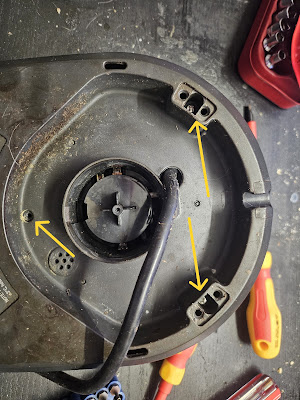
Dissassembly of Breville BTM800XL Tea Maker Base
Image
As I couldn't really find any instructions on how to do this, here's what I've discovered. Also, forgive how filthy it is, clearly I don't turn it upside down enough... Remove the three screws indicated with yellow arrows. Two of these are normal philips screws (under the foot pads, these can be removed with a flat screwdriver), the other is a small hex screw. Then, there are 4 screws that secure the circut board down And then, yup... that's a circuit board.

Salesforce: "No such column 'BOGUS' on entity"

To hopefully save someone the hours I just wasted. If you see this error message when doing an Create, Update, Upsert or Delete using the Force.com PHP Toolkit: Fatal error: Uncaught SoapFault exception: [sf:INVALID_FIELD] INVALID_FIELD: No such column 'BOGUS' on entity 'Thing__c'. It's because you've double wrapped the record array: $createArray = array(); $createArray[0]->Foo__c = 'bar'; $createResult = $sfdcConnection->create( array($createArray) , 'Thing__c'); The issue here of course being that the array called "$createArray" is being wrapped in another array... Avoid doing that...

Salesforce: Calling batch methods from other batch methods

Have you just had the fun situation where a Salesforce batch has run, which caused something (such as a trigger, etc) to cause another batch to attempt to run? If you have, then you know the frustration of getting the joyous error message below: Database.executeBatch cannot be called from a batch or future method. There are two ways of addressing the "Salesforce Feature". Rewrite your classes to not run if either System.isFuture() or System.isBatch() is true. or... Change the API version of all effected classes and triggers to exactly v27. This single version of the api allows batches to be called from batches. This is obviously not a "good" solution, but if it's a stupid solution, and it works, it's still a solution.

Auto Scaling Image height in Salesforce Formula Fields

You can use Images is formulas, but if you want to scale them you have to specify height and width not useful if your images are going to be random aspect ratios! So, simply replace the element you want to scale automatically with "-1". This is a valid formula: IMAGE( 'PATH_TO_IMAGE.PNG', 'The Alt Tag', -1, 200) that image will always be 200px wide, and as high as it needs to be.

Easy Maps for Account and Contact Addresses in Salesforce

Image
Some time ago, Salesforce had to remove their "Google Maps for Salesforce" from the App Exchange due to a change in Google's Licencing arrangements. I've not seen a good example of easy to use Google Maps in Salesforce since, so here are some Custom Field Formulas. Simply create a new Custom Field with a Forumla -> Text type, and copy/paste the below into the formula area. On the page layout, it works really well below the address entry areas. Each of these will display a static image map inline in Salesforce, and once the user clicks on the map, it will automatically display directions from the User's Address (stored on their User Profile) to that location. It will also complain to the user if they do not have an address on their profile, and will not display the Maps until they do. Account Billing Address if(or( $User.Street = "",  $User.City = "",  $User.Country  = ""),IMAGE("/img/samples/flag_red.gif", ...

Australian Business Number (ABN) Validation Rule for Salesforce.com

Assuming your Custom field is "ABN" (API Name = "ABN__c") then you can stuff this formula in a validation rule to ensure that ABNs entered are valid by using the same logic the government does . not(and (   LEN(TRIM( ABN__c )) == 11,   ISNUMBER(ABN__c),   mod(       (((VALUE(MID(ABN__c, 1, 1)) - 1 ) * 10) +  (VALUE(MID(ABN__c, 2, 1)) * 1) +  (VALUE(MID(ABN__c, 3, 1)) * 3) +  (VALUE(MID(ABN__c, 4, 1)) * 5) +  (VALUE(MID(ABN__c, 5, 1)) * 7) +  (VALUE(MID(ABN__c, 6, 1)) * 9) +  (VALUE(MID(ABN__c, 7, 1)) * 11) +  (VALUE(MID(ABN__c, 8, 1)) * 13) +  (VALUE(MID(ABN__c, 9, 1)) * 15) +  (VALUE(MID(ABN__c, 10, 1)) * 17) +  (VALUE(MID(ABN__c, 11, 1)) * 19)), 89   ) == 0 ))

Cairns Webcams for Cyclone Ita

Here are some links for Webcams around Far North Queensland. I'll strike them out as they go down. Cairns http://www.cairnsinfo.com/webcam-cairns-city.php http://www.webcamgalore.com/EN/webcam/Australia/Cairns/5131.html http://www.skyrail.com.au/webcam/coralsea http://www.tmr.qld.gov.au/Traffic-cameras-by-location/Traffic-cameras.aspx?region=Far%20North http://www.earthcam.com/search/ft_search.php?term=Cairns%2C+AUSTRALIA http://www.justin.tv/gawdor Cooktown http://www.the-webcam-network.com/Australia/Cooktown/143686.html

Adding Google Search to Internet Explorer in Australia

Image
After I get my computer rebuilt at work, one of the first things I do is change the Search provider to Google in whatever archaic version of Internet Explorer we are still using. However, when I tried to do this today, Google was not in the list of Search Providers: After a moderate amount of cursing and nashing of teeth, I hacked the URL to point to the US page: http://www.iegallery.com/ en-us /addons?callback=true&featuretype=2 And you can reach the specific Google Search provider here: http://www.iegallery.com/en-us/Addons/Details/813

Australian Postcode Boundaries for Google Earth (KMZ)

Image
I searched for ages, and couldn't find where to get a KMZ / KML file for Google Earth that had all the Australian Postcode Boundaries in it... So I made one based on the 1270.0.55.003 - Australian Statistical Geography Standard (ASGS): Volume 3 - Non ABS Structures, July 2011 . I claim no additional copyright on this, but please ensure you are able to use the data according to the ABS Copyright rules Here is the download link

Inline 18 digit Salesforce ID Excel formula

If you have not got the ability to create a Salesforce.com custom field to generate the 18 digit case insensetive ID, as demonstrated here , you can use this formula to convert the ID in "A2" to the 18 digit ID. Of course you can then extend this formula all the way down column A if you need to. =A2 & LOOKUP(IF(AND(CODE(RIGHT(LEFT($A2,5),1))>=65,CODE(RIGHT(LEFT($A2,5),1))<=90),1,0) & IF(AND(CODE(RIGHT(LEFT($A2,4),1))>=65,CODE(RIGHT(LEFT($A2,4),1))<=90),1,0) & IF(AND(CODE(RIGHT(LEFT($A2,3),1))>=65,CODE(RIGHT(LEFT($A2,3),1))<=90),1,0)& IF(AND(CODE(RIGHT(LEFT($A2,2),1))>=65,CODE(RIGHT(LEFT($A2,2),1))<=90),1,0)& IF(AND(CODE(LEFT($A2,1))>=65,CODE(LEFT($A2,1))<=90),1,0),{"00000","00001","00010","00011","00100","00101","00110","00111","01000","01001","01010","01011","01100","01101","0111...

Salesforce Merge Accounts URL Hacking

The Merge Accounts page is OK to use, however to start the process you have to search for the Accounts you want to merge, and to do that they have to have the same name. This is not always the case, and it can be annoying to have to rename an account, just so you can find it to merge it. The official SFDC selection screen also limits you to a max of 3 accounts. This isn't actually a hard limit... More of a guide, as you'll see below. Instead of this, you can actually hack the URL to include the IDs of any accounts, regardless of Account Name similarity. This is especially useful if you are using your own code to manage merges and would like to "deep link" into the SFDC platform. Here's an example URL: https://emea.salesforce.com/merge/accmergewizard.jsp?goNext=+Next+&cid=001200000012345&cid=001200000012346&cid=001200000012347&cid=001200000012348 It can be broken down into 3 main segments: The Merge Accounts page URL: https://emea.sale...

Air NZ

Image
No further comments....

Elementary

Image
.. my dear Watson. If you haven't heard / witnessed the power of the IBM Watson project, have a look below. This is all live and the questions are not fed into the computer in text form:

Reports are coming in after the Cyclone

I've had notification from people in Mareeba, Cairns and Townsville. Those areas appear to have survived reasonable well. It's the Cardwell - Ingham area that will be worst effected. The eye passed almost directly over Bingil Bay.

Port Dogulas Storm Surge Map

Image
I saw this map posted to facebook. View the complete album here . Lots of Info in there for people in Port Dogulas. Please bear in mind this is an older map and should be used as a guide only.

Cairns, Townsville and FNQ Webcams

Image
For those of us that can't be in Cairns, Townsville or anywhere in FNQ for Cyclone Yasi, I will add links to Webcams in Cairns as I find them below, and strike them out as they appear to fail :( Looks like power has gone in Cairns, so most of the cairns ones will be offline. CairnsGreatBarrierReef.org.au (2 minute limit, just refresh the page) CairnsCam.info (The timelaps feature should be quite interesting) CairnsWeatherCam.com.au Edge Hill QLD Transport Webcams: 1 , 2 , 3 , 4 CairnsInfo.com Mareeba (George Creek Orchards) Townsville T1 Apartments (Has ads, grrr) Mourilyan Innisfail Townsville - Castle Hill Townsvile 2 webcam Townsville, (West End?) Townsville - West End 2 4 Mile Beach Earlville- Cairns (Little Pink House) Cairns Beaches Cairns - Earlville Cairns - Earlville 2

4pm & 5pm (EST) Cyclone Update from CRC

Cairns Regional Council advises that for those residents who have no alternative for moving to higher ground, evacuation centres will be open at 6am Wednesday 2 February at the following locations: Redlynch High School James Cook University Smithfield State High School Babinda RSL Mossman Community Indoor Sports Centre Woree State High School Conditions at these locations are minimal and residents are encouraged to bring their own bedding, food and medications. Residents are urged to seek shelter with relatives and friends, as using these centres should be a last resort. At these centres no pets, alcohol or weapons of any description will be allowed. Contact the Centre on 4044 3377. If emergency medical assistance is required, dial 000. An evacuation advice has been issued for those residents in the ORANGE (and therefore RED ) Zone on this map . Residents in the ORANGE zone should commence evacuation to higher ground as soon as possible and should register with the ...

Evacuation Maps for Cairns

Image
A full rant will be following as to why the community has to provide these maps to each other when the council clearly cannot. Anyway. The last Update I was able to see on their website (1/02/2010 10pm EST) is that people in the ORANGE (and therefore RED ) Zones of the below map should evacuate. Download Evacuation Map: PDF ( Mirror ) PNG ( Hi Resolution PNG ) (Seriously CRC, a 12mb PDF? On your servers?) There's a lot of confusion going around about the RED , ORANGE and YELLOW zones. To (unofficially) clarify: The RED zones are the closest to sea level, and the most at risk of flooding. GET OUT NOW . ORANGE is next closest to sea level and as of 1/2/2011 has been advised to evacuate as well. YELLOW is on alert, but not advised to evacuate, yet. Here's just the ORANGE zones (which, obviously, include the RED zones). Click to make bigger:

Cairns Storm Surge Maps

Image
Cairns Regional Council's Storm Surge Map server is being hammered. The Queensland Police have a mirror available . Also, be sure you check out the Evacuation Maps

One "Art" please.

Image
It's not often I agree with "modern" art. But then again, this is really just contemporary art with modern tools: